Mudanças entre as edições de "Erro whitelist cphulk"
De Wiki Integrator do Brasil
| Linha 1: | Linha 1: | ||
| + | [[File:Banner-wiki-promocoes.gif|center| 700px||border|link=https://www.integrator.com.br/plano-hospedagem-promocionais|Planos promocionais|]] | ||
| + | |||
| + | |||
| + | ---- | ||
| + | ---- | ||
| + | ---- | ||
Entre no painel, vá em '''Security Center >> cPHulk Brute Force Protection''', '''Login/Brute History Report'''. | Entre no painel, vá em '''Security Center >> cPHulk Brute Force Protection''', '''Login/Brute History Report'''. | ||
Edição das 16h19min de 28 de agosto de 2018
Entre no painel, vá em Security Center >> cPHulk Brute Force Protection, Login/Brute History Report.

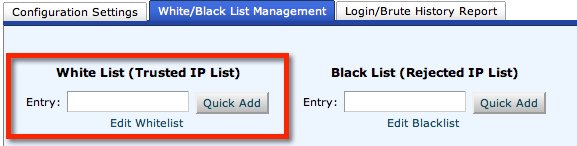
Adicione seu IP em White/Black List Management, em White List (Trusted IP List) e confirme Quick Add.
Depois, clique em Enable.

